What do my product's lights indicate?
-
You can often diagnose problems with your scanner by checking its lights.
ES-400
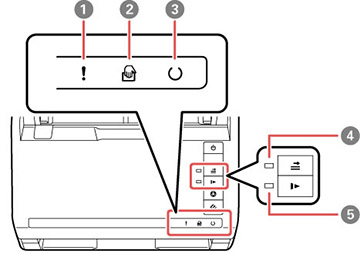
1 ! error light 2  automatic feeding mode light
3  ready light
4  double feed detection skip light
5  slow mode light
ES-500W

1  AP mode light
2  Wi-Fi on/off light
3 ! error light 4 automatic feeding mode light5 ready light6 double feed detection skip light7 slow mode lightLight status Condition/solution ! error light is flashing slowly A paper jam or a double feed has occurred. Remove any paper loaded in the input tray. If the light continues to flash, a scanner error may have occurred. Turn the scanner off and then back on again. If the error continues, contact Epson for support. ! error light is on The scanner cover is open. Make sure the scanner cover is closed and there is no jammed paper inside. Any of the following lights are flashing quickly: - ! error
- ready
- AP mode (ES-500W)
- Wi-Fi on/off (ES-500W)
A fatal error has occurred. Try the following: - Check the scanner connection to your computer to make sure it is secure.
- Turn the scanner off and then back on again. If the error continues, the scanner may be malfunctioning. Contact Epson for support.
ready light is off and any of the following lights are on: - ! error
- automatic feeding mode
- double feed detection skip
- slow mode
- AP mode (ES-500W)
- Wi-Fi on/off (ES-500W)
The firmware update has failed and the scanner is in recovery mode. Try updating the firmware again. The following lights are simultaneously flashing slowly: (ES-500W) - ! error
- Wi-Fi on/off
Wi-Fi on/off light is flashing slowly and ! error light is onAn access point settings error (security error) has occurred. Press the  stop button to clear the error, restart the devices you want to connect to the network, then reconnect to the network. Wi-Fi on/off and ! error lights are flashing slowly (ES-500W)
A network connection error has occurred (the date and time have not been set correctly). Reset the date and time in Web Config.
Related references
Original Jams in Scanner
Where to Get Help
Related information
Loading Originals
Wi-Fi Networking
Scanning
Published: Dec 12, 2016
Was this helpful? Thank you for the feedback!