-
Store
Official Epson Store
-
Printers
Printers
- Home & Home Office
- Office Printers & Copiers
- Professional Imaging
- Label Printers & Presses
Office Printers & CopiersResourcesApplicationsProfessional ImagingLabel Printers & Presses - Ink
-
Projectors
Business & EducationLarge Venue
-
Scanners
Scanners
-
Point of Sale
Point of Sale
- Receipt Printers
- Label Printers
- Check Scanners & Validation Devices
- Kitchen Display Systems
Receipt PrintersApplicationsLabel PrintersResourcesApplicationsCheck Scanners & Validation DevicesResourcesApplicationsKitchen Display SystemsResourcesApplicationsSAT -
Robots
Industries
- Industries
-
Support
Product Support
Home Cinema 1100
Check the following:
- Make sure the projector is connected to a network with Internet access.
- Make sure the Apple device is connected to the same network as the projector.
- Make sure the Time Difference (UTC) setting on the projector matches the region where the projector is installed.
To check the setting, select Menu > Extended > Operation > Date & Time > Time Difference (UTC).
Note: See the FAQ below or search online to determine the UTC for your area.
- Make sure the Daylight Saving Time setting is set correctly for your region.
To check the setting, select Menu > Extended > Operation > Date & Time > Daylight Saving Time.
Note: Search online to determine the DST for your area.
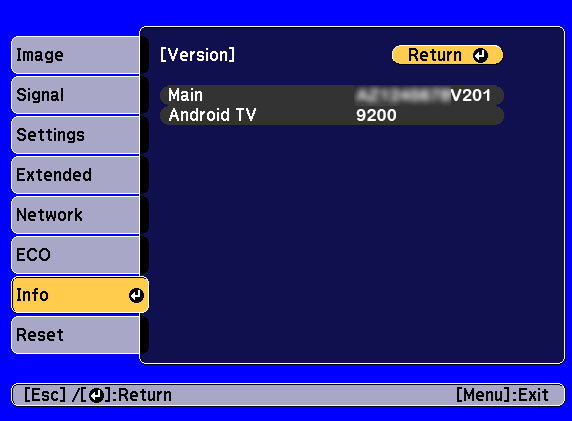
Make sure the last four digits of your projector's Main firmware version ends with V201 or later and the Android TV version is 9200 or later.

To check which firmware version is installed, select Menu > Info > Version. If you need to update the firmware, see Updating the Firmware over the Network for instructions.
Note: Run the update again if you do not see that both firmware versions were updated.
See the links below for instructions.
See the table below to determine the Time Difference (UTC) setting for your time zone. The table below covers Standard and Daylight Saving Time (DST) for North America.
If you are in a region that observes daylight savings time (DST), please turn on DST, set the DST detailed settings, and set the UTC time difference on the projector to the highlighted value in the table for your time zone.
You can also search online to determine the DST for your area.
UTC
| Time Zone | Abbreviation (Standard / DST) | UTC Time Difference (Standard) | UTC Time Difference (DST) | DST Observed |
|---|---|---|---|---|
| Atlantic | AST | UTC-4 | UTC-3 | Yes |
| Eastern | EST/EDT | UTC-5 | UTC-4 | Yes |
| Central | CST/CDT | UTC-6 | UTC-5 | Yes |
| Mountain | MST/MDT | UTC-7 | UTC-6 | Yes* |
| Pacific | PST/PDT | UTC-8 | UTC-7 | Yes |
| Alaska | AKST/AKDT | UTC-9 | UTC-8 | Yes |
| Hawaii-Aleutian | HAST/HADT | UTC-10 | UTC-9 | No* |
Standard Daylight Savings (DST) Schedule (most of the U.S. and Canada)
- Begins: Second Sunday in March
- Ends: First Sunday in November
- Adjustment: Clocks are moved forward one hour in March and turned back one hour in November
*Exceptions & Variations
- Arizona (except the Navajo Nation): Does not observe DST.
- U.S. Territories (Puerto Rico, Guam, American Samoa, U.S. Virgin Islands, Northern Mariana Islands): Do not observe DST.
- Hawaii does not observe DST but the Aleutian Islands do observe DST.
- Canada: Yukon, most of Saskatchewan, some locations in Québec east of 63° westerly longitude, Southampton Island, and some areas in British Columbia do not observe DST.
PowerLite 1290, 994F, and EX9270
Check the following:
- Make sure the projector is connected to a network with Internet access.
- Make sure the Apple device is connected to the same network as the projector.
- Make sure the Time Difference (UTC) setting on the projector matches the region where the projector is installed.
To check the setting, select Menu > Extended > Operation > Date & Time > Time Difference (UTC).
Note: See the FAQ below or search online to determine the UTC for your area.
- Make sure the Daylight Saving Time setting is set correctly for your region.
To check the setting, select Menu > Extended > Operation > Date & Time > Daylight Saving Time.
Note: Search online to determine the DST for your area.
Make sure the last four digits of your projector's Main firmware version ends with V201 or later and the Android TV version is 9200 or later.

To check which versions are installed, select Menu > Info > Version. If you need to update the firmware, see Updating the Firmware over the Network for instructions.
Note: Run the update again if you do not see that both firmware versions were updated.
See the links below for instructions.
See the table below to determine the Time Difference (UTC) setting for your time zone. The table below covers Standard and Daylight Saving Time (DST) for North America.
If you are in a region that observes daylight savings time (DST), please turn on DST, set the DST detailed settings, and set the UTC time difference on the projector to the highlighted value in the table for your time zone.
You can also search online to determine the DST for your area.
UTC
| Time Zone | Abbreviation (Standard / DST) | UTC Time Difference (Standard) | UTC Time Difference (DST) | DST Observed |
|---|---|---|---|---|
| Atlantic | AST | UTC-4 | UTC-3 | Yes |
| Eastern | EST/EDT | UTC-5 | UTC-4 | Yes |
| Central | CST/CDT | UTC-6 | UTC-5 | Yes |
| Mountain | MST/MDT | UTC-7 | UTC-6 | Yes* |
| Pacific | PST/PDT | UTC-8 | UTC-7 | Yes |
| Alaska | AKST/AKDT | UTC-9 | UTC-8 | Yes |
| Hawaii-Aleutian | HAST/HADT | UTC-10 | UTC-9 | No* |
Standard Daylight Savings (DST) Schedule (most of the U.S. and Canada)
- Begins: Second Sunday in March
- Ends: First Sunday in November
- Adjustment: Clocks are moved forward one hour in March and turned back one hour in November
*Exceptions & Variations
- Arizona (except the Navajo Nation): Does not observe DST.
- U.S. Territories (Puerto Rico, Guam, American Samoa, U.S. Virgin Islands, Northern Mariana Islands): Do not observe DST.
- Hawaii does not observe DST but the Aleutian Islands do observe DST.
- Canada: Yukon, most of Saskatchewan, some locations in Québec east of 63° westerly longitude, Southampton Island, and some areas in British Columbia do not observe DST.